

About JSON Editor - Viewer & Format
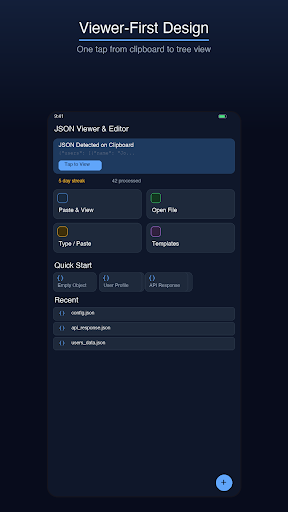
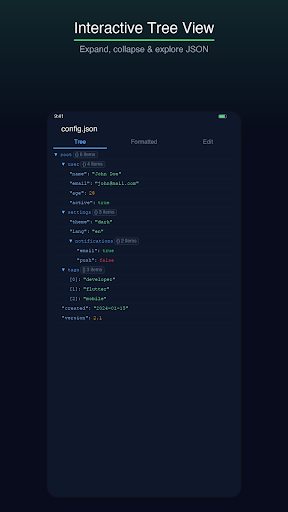
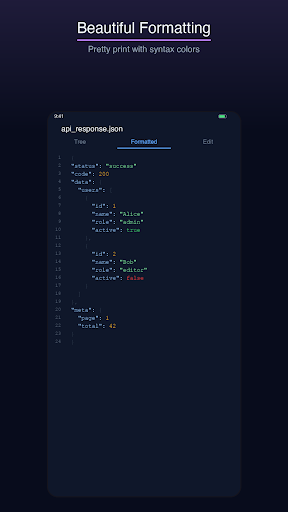
JSON Viewer & Editor is the most powerful JSON tool for mobile devices. It auto-detects JSON on your clipboard and lets you view it instantly with one tap. Explore complex JSON structures with an interactive, expandable tree view that color-codes strings, numbers, booleans, and null values. The formatted view shows pretty-printed JSON with line numbers and syntax highlighting. Need to edit? Switch to the built-in editor with smart keyboard shortcuts for brackets, quotes, colons, and common values. Validate your JSON in real-time and see error locations highlighted. Convert JSON to YAML, CSV, or key-value format with a single tap. JSONVEdit also includes file support (open .json files), search within JSON trees, expand/collapse all nodes, and JSON statistics (key count, depth, size). Auto-saved sessions mean you never lose your work.
See it in action
Everything You Need
Interactive Tree View
Explore JSON with an expandable, collapsible tree. Color-coded values for strings, numbers, booleans, and nulls. Item counts on objects and arrays. Search and filter nodes.
Pretty Print & Minify
One-tap JSON formatting with proper indentation. Minify JSON to a single line for API payloads. Copy formatted or minified output instantly.
Real-Time Validation
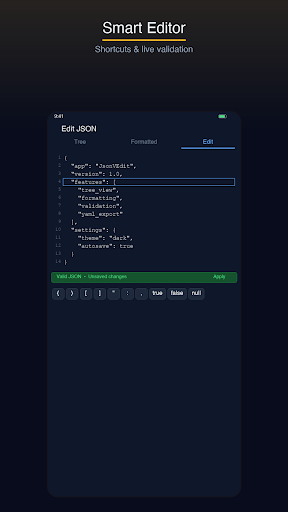
Live JSON validation as you type. Error messages with exact line and character positions. Green status bar for valid JSON, red for errors.
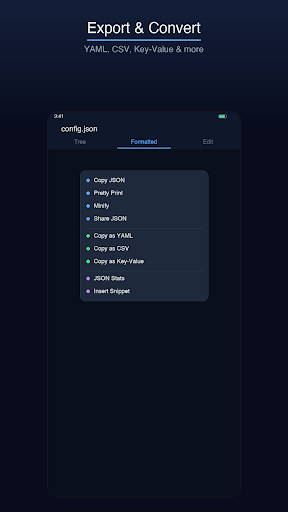
Convert to YAML, CSV & Key-Value
Transform JSON to YAML format, CSV tables, or flat key-value pairs with one tap. Copy the converted output or share it directly.
Clipboard Auto-Detect
JSONVEdit automatically detects JSON on your clipboard when you open the app. One tap to view — no pasting required. The fastest way to inspect JSON.
Smart Editor Shortcuts
Dedicated shortcut keys for { } [ ] " : , true false null and indent. The keyboard stays open while you tap shortcuts — no focus stealing.
Ready to Try JSON Editor - Viewer & Format?
Free to download. No account required. Available on Android and iOS.
Frequently Asked Questions
More from Cosmovex
Explore our other developer tools

WebEva: Build Websites & Code
Web DevelopmentBuild websites from your phone.

Aspenote: Offline Voice to Text
ProductivityIt writes it down. On your phone.

HostPilot: PHP Server & SQL
Developer ToolsTurn your phone into a web server.
DevBuddy: Offline Dev Toolkit
Developer ToolsYour pocket developer toolkit.

ShellPilot - Batch SSH Client
DevOps & ServersSSH terminal & SFTP on the go.

API Client -REST & HTTP Tester
API TestingTest APIs anywhere, anytime.

HTML Viewer & Editor - Code
Code EditorView & edit HTML on mobile.
SQLite Editor & SQL Learner
Data ToolsManage SQLite databases on mobile.

Python IDE - Offline Compiler
Code EditorWrite and run Python on your phone.

Java & Kotlin Compiler IDE
Code EditorWrite and run Java on your phone.
PDF Viewer & Editor - AI
ProductivityEdit, convert & sign PDFs on mobile.

XML Viewer & Editor
Data ToolsView, edit & validate XML on mobile.

Open CSV — Viewer & Editor
Data ToolsOpen and edit CSV files on mobile.

JavaScript Editor — React IDE
Code EditorRun JavaScript and React on your phone.

Image to SVG Converter, Viewer
Design ToolsConvert images to SVG and edit vectors on mobile.

YAML / YML Viewer & Editor
Data ToolsView, edit & validate YAML instantly.

Markdown Editor & MD Viewer
Text EditorWrite and preview Markdown on mobile.

Network Toolkit: WiFi IP Tools
Network ToolsNetwork utilities and diagnostic tools.

Code Editor - Text & Notepad
Text EditorEdit text files on mobile.
C / C++ Compiler IDE
Developer ToolsCompile & run C and C++ on your phone.
Diagram Maker: Flow & ERD
Design ToolsDraw flowcharts & ERDs on mobile.

QR Scanner & Generator
ToolsScan codes with confidence

Zip Extractor — Unzip RAR 7Z
ToolsOpen ZIP, RAR, and 7Z files

PromptCrate: AI Prompt Manager
ProductivityYour personal AI prompt library

Markdown & MD: Notes, AI
Developer ToolsAI markdown workspace with Mermaid & GitHub sync.